Enrixa IndiaPost for Shopify
Book, Print and Track India Post Shipments in Shopify
Connect your store with India Post. Book prepaid and cash on delivery orders, print labels, and keep customers updated under your own India Post contract.
Ship with India Post Without the Manual Work
Managing orders in Shopify and booking parcels separately adds work for your shipping team. Enrixa IndiaPost brings the process together.
- ✓
Less repetitive entry — Book selected Shopify orders together instead of entering each order in a separate portal.
- ✓
Catch issues before booking — Check orders against India Post requirements and see what needs fixing.
- ✓
Labels in one place — Print a single shipping label or combine a batch into one PDF.
- ✓
Customers kept informed — India Post article IDs and tracking scans follow your orders into Shopify.
Our Solution: Enrixa IndiaPost
A Shopify app that connects your store with your own India Post business account.
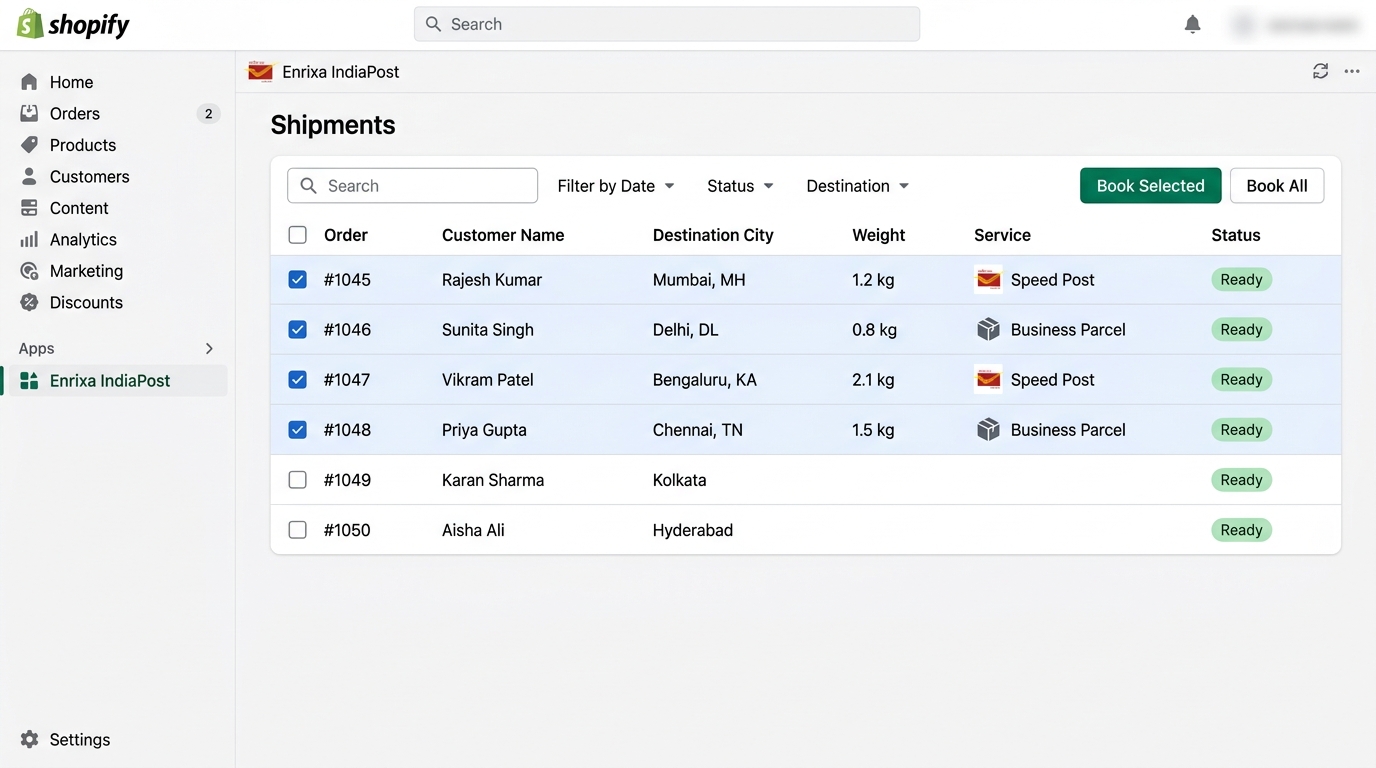
Seamedia’s India Post integration helps you book Speed Post and Business Parcel shipments, prepare labels, and track deliveries from your Shopify shipping workflow.
- Your own contract — Use the India Post services and rates available under your business account.
- Prepaid and cash on delivery — Handle both order types, with COD available where your contract supports it.
- Connected shipping workflow — Move from ready-to-book orders to printed labels, parcel handover, and delivery updates.
- Guidance from Seamedia — Get help understanding your account requirements and connecting your store.
Core Features
Everything you need to book, label, and track India Post shipments from your Shopify store.
- ✓
Bulk and automatic booking
Book one order or a selected batch, or enable automatic booking for new orders using the services included in your India Post contract.
- ✓
Labels ready to print
Generate A5, A6, or A7 labels with each booking. Print one label or combine a day’s parcels into a single PDF.
- ✓
Automatic barcode allocation
Assign article IDs from the ranges India Post has allotted you. A booking retry reuses the same ID.
- ✓
Resolve shipment issues
See which orders need attention, understand validation failures, and fix missing information before booking.
- ✓
Tracking in Shopify
Use the article ID as the Shopify tracking number. India Post scans update shipments and Shopify orders, and customers can look up parcels through your store’s tracking link.
- ✓
Cash on delivery support
Configure your COD payment methods and collection amounts for orders shipped under an India Post contract that includes COD.
From Order to Doorstep
A connected shipping workflow in three steps.
- 01
Select Your Orders
Review prepaid and COD orders, resolve validation issues, and select the shipments you want to book.
- 02
Book and Print Labels
Book with India Post, print your labels individually or as a PDF batch, and record parcel handover.
- 03
Track to Delivery
Follow India Post scans on the shipment and the Shopify order, keeping delivery information connected.
Who This Is Built For
Shopify merchants shipping with their own India Post business account.
D2C brandsGrowing Shopify storesPrepaid and COD sellersShipping and operations teams
What You Need to Get Started
Your contract. Our connection.
India Post manages account approval, service availability, rates, postage, and COD settlement. Seamedia connects your account with Shopify.
Read the India Post Setup Guide →- Business account — Your India Post customer ID.
- API access — CEPT-issued API credentials for your account.
- Service contracts — Contract IDs for the services you use.
- Article ID range — The barcodes India Post has allotted you.
- Server approval — India Post approval for the integration server.
Frequently Asked Questions
What is Enrixa IndiaPost?
Enrixa IndiaPost is a Shopify app by Seamedia for booking India Post shipments, printing labels, and tracking parcels in Shopify under your own India Post contract.
What do I need from India Post?
You need an India Post business account and customer ID, CEPT-issued API credentials, a contract for each service, an allotted article ID range, and approval for the integration server. The app’s setup guide explains these requirements. Do not send passwords or API credentials through a contact form.
Does it support cash on delivery?
Yes. Orders using the payment methods you configure can be booked as cash on delivery with the collection amount, provided your India Post contract includes COD. Rates, billing, and COD settlement remain between you and India Post.
How do labels and tracking work?
Labels are generated with each booking in A5, A6, or A7 format. Print a single label or combine multiple labels into one PDF. The India Post article ID becomes the Shopify tracking number, and tracking scans update the shipment and Shopify order.
What does the app cost?
The app is free during early access. India Post postage is billed separately under your own contract. Visit the product website for the latest availability and pricing before you sign up.
How can I install the app or get help?
Request early access through the product website. Stores are being onboarded individually with setup guidance. For product support, email support@myenrixa.com.
Ready to Connect India Post with Shopify?
Bring booking, labels, and tracking together with Enrixa IndiaPost.
Start Shipping with Enrixa IndiaPost
Request early access and get help connecting your Shopify store. The app is free during early access; India Post postage is billed separately under your contract.
Enrixa IndiaPost is an independent app by Seamedia and is not affiliated with or endorsed by India Post. Shopify and India Post are trademarks of their respective owners.