


How to migrate your Magento 1 website to shopify platform?
As magento 1 is sunset arrive June 2020, all magento store owners are trying to migrate their existing website into Magento 2 or some other popular e-commerce platform like shopify or woocommerce.
Recently I had migrated one of my client two Magento 1 site into shopify. Initially we were planning to use some popular data migration tool to migrate data from Magento to shopify, but it did not work well for us.
Here is the steps I followed for successful migration.
1 – Preparing magento data to shopify format
Getbras.com is selling women’s inner wear and product was added in magento sites as configurable products and child variation based on size and color. So we need to follow same structure in shopify site too.
We can directly export data from magento to CSV, but we cannot get exact structure how we need to import into shopify. So I decided to write a custom php script to generate data from magento 1 and save it to MYSQL table. You can directly export to CSV, for storing table can help us to do some process later if needed.
Necessary data we need to import a configurable products to shopify are:
- Handle
- Title
- Body HTML
- Vendor
- Type
- Tags
- Published
- Option1 Name
- Option1 Value
- Option2 Name
- Option2 Value
- Variant SKU
- Variant Grams
- Variant_Inventory_Tracke
- Variant_Inventory_Qty
- Variant_Inventory_Policy
- Variant_Fulfillment_Service
- Variant_Price
- Variant_Compare_At_Price
- Variant_Requires_Shipping
- Variant_Taxable
- Variant_Barcode
- Image_Src
- Image_Position
- Image_Alt_Text
- SEO_Title
- SEO_Description
- Variant_Weight_Unit
- Variant_Tax_Code
I have created mysql table for storing above data and generate data using custom magento 1 script. Here is the php code use
<?php
ini_set('memory_limit','2048M');
ini_set('max_execution_time',12000);
require_once "app/Mage.php";
$root=$_SERVER['DOCUMENT_ROOT'];
Mage::app("default");
Mage::app()->loadAreaPart(Mage_Core_Model_App_Area::AREA_FRONTEND,Mage_Core_Model_App_Area::PART_EVENTS);
//Mage::init();
$connection = Mage::getSingleton('core/resource')->getConnection('dbname');
$_helper = Mage::helper('catalog/output');
$helper = Mage::helper('shoppersettings/image');
$imgX = 252;
$imgY = $helper->calculateHeight($imgX);
//$filename = 'google_pla_feed_magento.csv';
$link=mysql_connect("localhost",'','');
mysql_select_db('dbname',$link);
https://bras-honey.myshopify.com/search?type=product&q=Loungeable%2Bboutique
$_productCollection = Mage::getModel("catalog/product")->getCollection()->addAttributeToSelect(array('pre_order','name', 'price','special_price','brand','color','size','lingerie_type', 'image', 'status','short_description','description','sku','created_at'))
->addAttributeToFilter('type_id', array('eq' => 'configurable'))
->addAttributeToFilter('entity_id', array('gt' => $last_id))
->addAttributeToFilter('status', array('eq' => Mage_Catalog_Model_Product_Status::STATUS_ENABLED));
//->setPageSize(10);
//->setCurPage($p)
$i=0;
$k=0;
foreach ($_productCollection as $_product):
$name= $_product->getName();
$name=str_replace("&","&",$name);
$sku=$_product->getSku();
$created_at=$_product->getCreatedAt();
$text=explode(" ",$sku);
$sku=$text[0];
$url_key = $_product->getProductUrl();
$full_url_key = $_product->getProductUrl();
//preparing unique handle for shopify
$url_key = str_replace("https://www.example.com/", "", $url_key);
$url_key = str_replace(".html", "", $url_key);
$id=$_product->getId();
$pre_order_status=$_product->getPreOrder();
if($pre_order_status==""):
$pre_order_status=0;
endif;
$product = Mage::getModel('catalog/product')->load($id);
$desc=strip_tags($product->getDescription());
$desc=str_replace(" "," ",$desc);
$desc=str_replace("&","&",$desc);
$desc1=$product->getDescription();
$short_desc1=$product->getShortDescription();
$productMediaConfig = Mage::getModel('catalog/product_media_config');
$image_url = $productMediaConfig->getMediaUrl($product->getImage());
$final_price=$product->getFinalPrice();
$meta_title=$product->getMetaTitle();
$meta_desc=$product->getMetaDescription();
$special_price=$product->getSpecialPrice();
$type_id=$product->getLingerieType();
$brand_id=$product->getBrand();
$final_price=number_format($final_price, 2, '.', '');
$desc1=str_replace(" "," ",$desc1);
$desc1=str_replace("&","&",$desc1);
$desc1=str_replace('\\',"",$desc1);
$desc1=str_replace("'","\'",$desc1);
$short_desc1=str_replace(" "," ",$short_desc1);
$short_desc1=str_replace("&","&",$short_desc1);
$short_desc1=str_replace('\\',"",$short_desc1);
$short_desc1=str_replace("'","\'",$short_desc1);
$desc1 = $short_desc1.$desc1;
preg_match_all('~<a(.*?)href="([^"]+)"(.*?)>~', $desc1, $matches);
foreach ($matches[2] as $key => $value) {
$value = str_replace("https://www.example.com/", "", $value);
$value = str_replace("http://www.example.com/", "", $value);
// echo '-----';
//replacing magento url in the content with shopify url
$sql1="SELECT id_path FROM mg_core_url_rewrite WHERE request_path='$value'";
$res1=mysql_query($sql1,$link) or die(mysql_error());
if(mysql_num_rows($res1)>0){
while($rs1=mysql_fetch_object($res1)){
$id_path = $rs1->id_path;
if(strpos($id_path,'product/') !== false){
$value1 = 'products/'.$value;
$desc1 = str_replace($value,$value1,$desc1);
}elseif(strpos($id_path,'category/') !== false){
$text = explode("/",$value);
$l = count($text);
$value1 = 'collections/'.$text[$l-1];
$desc1 = str_replace($value,$value1,$desc1);
}
}
}
if(strpos($value,'catalogsearch/') !== false){
$text = explode("?q=",$value);
$value1 = 'search?type=product&q='.$text[1];
$desc1 = str_replace($value,$value1,$desc1);
}
}
$desc1 = str_replace(".html","",$desc1);
$pId="";
$status=0;
$lingerie_type="";
$brand = Mage::getModel('catalog/product')->load($id)->getAttributeText('brand');
$brand1=$brand;
$brand=str_replace("&","&",$brand);
$lingerie_type = Mage::getModel('catalog/product')->load($id)->getAttributeText('lingerie_type');
$lingerie_type1=$lingerie_type;
$lingerie_type=str_replace("&","&",$lingerie_type);
if($lingerie_type==""):
$lingerie_type="Lingerie";
endif;
$product = Mage::getModel('catalog/product')->load($id);
$childProducts = Mage::getModel('catalog/product_type_configurable')->getUsedProducts(null,$product);
$cats = $_product->getCategoryIds();
$j=0;
$category_name="";
foreach ($cats as $category_id){
$_cat = Mage::getModel('catalog/category')->load($category_id) ;
if($j<10):
$category_name.=trim($_cat->getName()).',';
endif;
$j++;
}
$category_name=substr($category_name,0,strlen($category_name)-1);
//getting child variants of magento configurable products
foreach($childProducts as $child) {
$k++;
$child_sku =$child->getSku();
$child_id=$child->getId();
$child_name=$child->getName();
$weight=$child->getWeight();
$qty=$child->getQty();
$size_id=$child->getSize();
$color_id=$child->getColor();
$type_id =$child->getLingerieType();
$size = Mage::getModel('catalog/product')->load($child_id)->getAttributeText('size');
$color = Mage::getModel('catalog/product')->load($child_id)->getAttributeText('color');
$lingerie_type = Mage::getModel('catalog/product')->load($child_id)->getAttributeText('lingerie_type');
$text=explode("-",$child_sku);
$text1=explode(" ",$text[2]);
$child_sku=$text[0].'-'.$text[1].'-'.$text1[0];
$name = mysql_real_escape_string($name);
$meta_title = mysql_real_escape_string($meta_title);
$meta_desc = mysql_real_escape_string($meta_desc);
//adding product temp mysql table
$sql="INSERT INTO magento_shopify(Handle,Title,Body_HTML,Vendor,Type,Tags,Option1_Value,Option2_Value,Variant_SKU,Variant_Grams,Variant_Inventory_Qty,Variant_Price,Variant_Compare_At_Price,Variant_Barcode,Image_Src,Image_Position,Image_Alt_Text,SEO_Title,SEO_Description,Variant_Tax_Code) VALUES ('$url_key','$name','$desc1','$brand','$lingerie_type','$category_name','$color','$size','$child_sku','$weight','$qty','$final_price','$special_price','','$image_url','','$name','$meta_title','$meta_desc','')";
mysql_query($sql,$link) or die(mysql_error());
}
$i++;
endforeach;
exit;
?>
After run above script you can see all of your necessary magento data in mysql table. You can check and verify using phpmyadmin
An example screenshot here: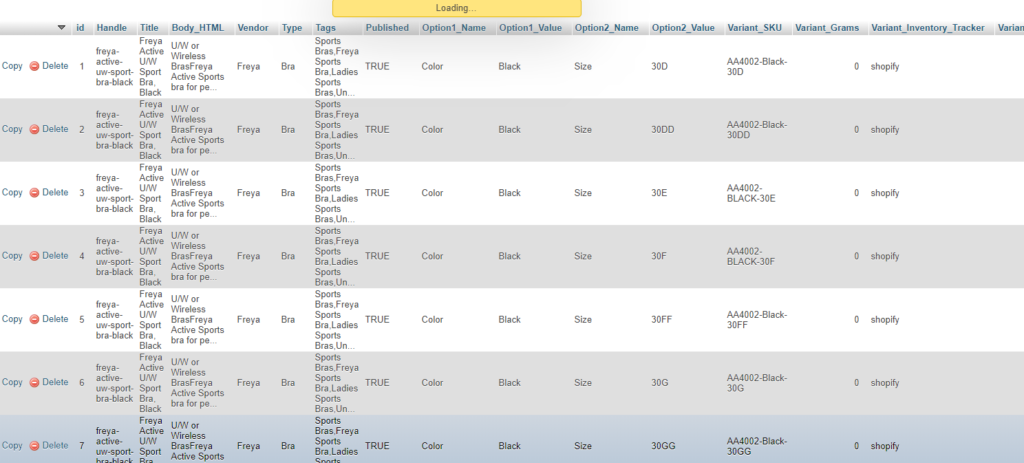
Now you can export data from phpmyadmin
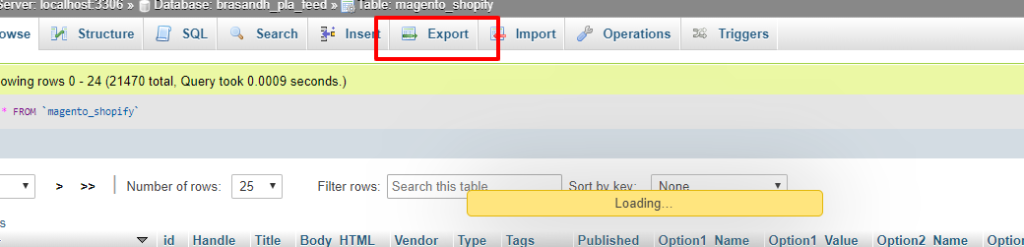
Export data as CSV format and add column name as header
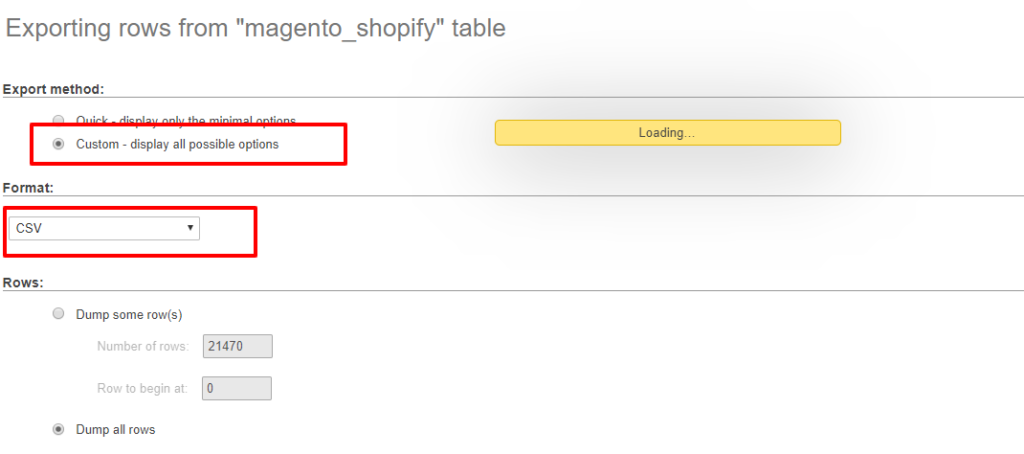
After export data, the csv file need to open in excel and update column header which is matching with shopify import csv template, an example CSV we used here below

