


If you’re running a US-based Shopify store and only selling domestically, you’re leaving money on a table that spans six continents. Statista projects global cross-border e-commerce will reach $6.5 trillion by 2025 — and 42% of US online shoppers have already bought from an international website. The demand flows both ways.
Shopify Markets international selling is the built-in toolkit that lets you handle multi-currency pricing, local languages, and cross-border tax collection — all from one Shopify admin. You don’t need a second store or a third-party app to get started. This guide walks you through every step, including the parts most tutorials skip: shipping logistics, DDP vs. DDU decisions, real conversion fee math, and a two-track expansion strategy based on where your customers actually are.
This article is for US Shopify merchants on the Basic, Shopify, or Advanced plan who want to sell internationally without rebuilding their store from scratch.
What Shopify Markets Actually Does (and What It Doesn’t)
Shopify Markets is a settings layer inside your existing store. It lets you create separate “markets” — essentially geo-targeted storefronts — each with its own currency, language, domain or subfolder, pricing rules, and payment methods. Shopify supports over 133 currencies and 20 languages as of 2024.
What it doesn’t do: it won’t automatically translate your product descriptions or handle all customs paperwork for you. You still need to make decisions. Markets just gives you the controls to act on those decisions at scale.
Key features you’ll use as a US retailer:
- Local currency pricing — show prices in CAD, GBP, EUR, AUD, and 130+ others
- Automatic currency conversion — Shopify adjusts prices in real time based on exchange rates
- Rounding rules — set psychological price points like £19.99 instead of £19.87
- Localized domains — use yourstore.com/en-gb or yourstore.co.uk per market
- Duty and import tax collection — collect at checkout so customers aren’t hit with surprise fees at the door
One important clarification: Shopify Markets is not the same as Shopify Plus Markets Pro. The standard Markets feature is available on all paid plans. Markets Pro (which handles some compliance and remittance automatically) is a paid add-on with different pricing. This guide covers standard Markets.
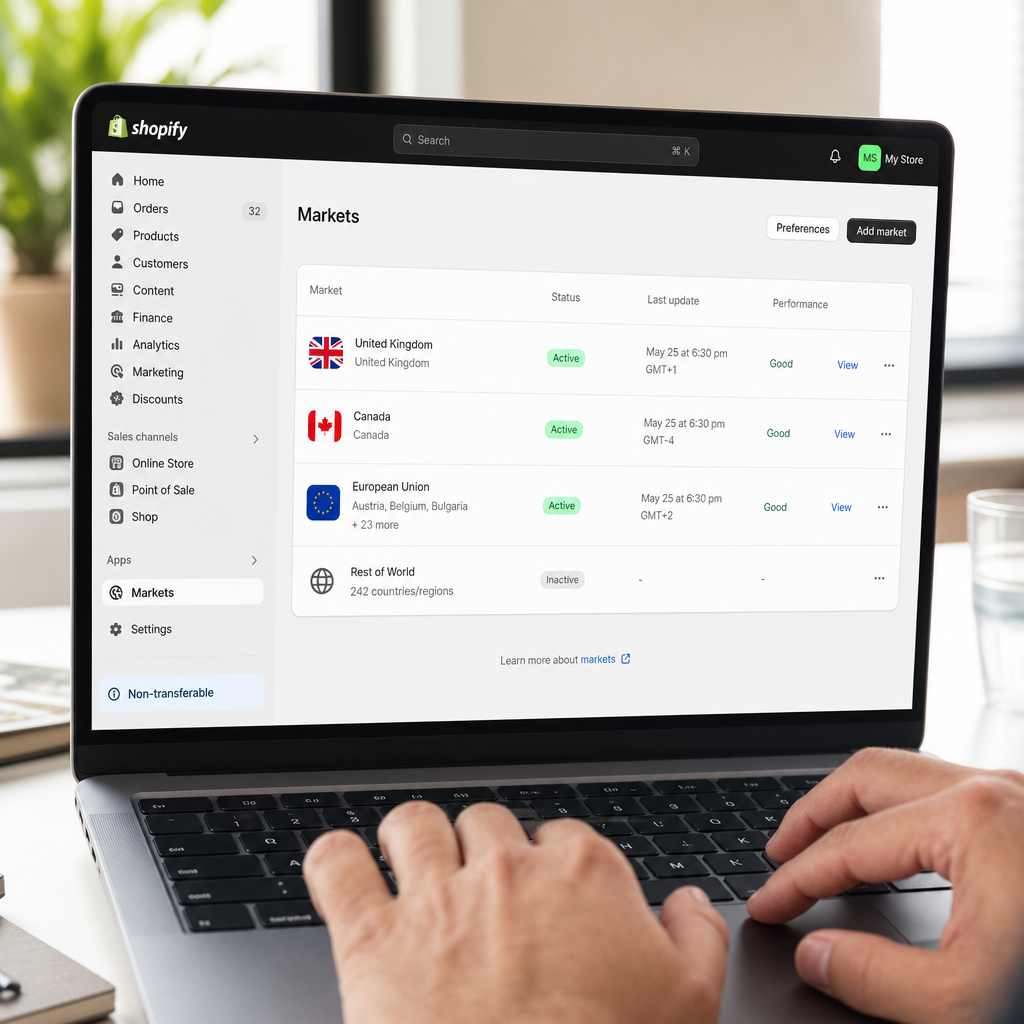
Shopify Multi-Currency Setup: Step-by-Step
Before touching Markets, you need Shopify Payments enabled. Markets’ currency conversion feature only works through Shopify Payments — PayPal and Stripe don’t support real-time local currency display through this system. If you’re currently on PayPal or Stripe, read the callout below before proceeding.
Switching from PayPal or Stripe to Shopify Payments
Shopify Payments approval typically takes 1–3 business days for US merchants. You’ll need a US bank account, SSN or EIN, and a government-issued ID. Once approved, your transaction fees drop to $0 per transaction (versus 0.5–2% extra for third-party processors on paid plans).
Early termination warning: If you have a fixed-term contract with Stripe or a PayPal merchant account with monthly minimums, check your agreement before switching. Most standard Stripe and PayPal accounts have no termination fees, but some negotiated enterprise contracts do. You can run Shopify Payments as your primary processor and keep PayPal as an alternate checkout option — many stores do this to accommodate customers who prefer PayPal without losing the multi-currency benefit.
Once Shopify Payments is live, here’s how to activate Markets:
- Go to Settings → Markets in your Shopify admin
- Your domestic US market is already set up. Click Add market
- Select countries or regions — you can group multiple countries into one market (e.g., a “Europe” market covering France, Germany, Italy)
- Under Currencies, enable the local currency for that market
- Set your price rounding rules — for most consumer retail, “round to nearest .99” works well
- Under Languages, assign a language (you can add translated content later)
- Save and publish the market
At this point, customers visiting from that region will see prices in their local currency. Shopify uses mid-market exchange rates updated hourly, then applies your rounding rules on top.
Understanding the 1.5% Currency Conversion Fee
Shopify charges a 1.5% currency conversion fee on every transaction processed in a non-USD currency through Shopify Payments. This is separate from your plan’s transaction fee. Here’s what it looks like in practice:
Say a UK customer buys a $100 item. At a 0.79 GBP/USD rate, they pay roughly £79. Shopify settles that £79 in USD to your bank account. The 1.5% conversion fee on $100 = $1.50. If your gross margin on that item is 40% ($40), your net margin after the fee is $38.50 — a 3.75% reduction on margin, not on revenue. At volume, this adds up: 1,000 such transactions per month = $1,500 in conversion fees.
Whether that’s worth it depends on your international order volume and average order value. For most stores where international traffic is currently zero, $1.50 per order is a non-issue. Budget for it once international orders exceed 10% of total volume.
Two-Track Market Expansion Strategy
Not every international market needs the same level of setup. I’ve seen US retailers over-engineer their first expansion and stall. Here’s a simpler framework based on where the friction actually is:
Track 1: Currency-Only Markets (English-Speaking Countries)
Canada, the UK, Australia, and New Zealand all speak English, so your existing product copy works. The only barrier is currency and local payment preferences. For these markets, you just need to:
- Enable local currency (CAD, GBP, AUD, NZD) in Markets
- Set country-specific shipping rates in your Shopify Shipping settings
- Verify your product descriptions don’t use US-only references (e.g., “free shipping in the contiguous US”)
- Check that your return policy is accessible to international buyers
Setup time: 2–4 hours. Cost: just the 1.5% conversion fee on transactions. These four markets alone represent a combined e-commerce market of over $400 billion annually and have high affinity for US brands.
Track 2: Translation + Currency (EU Non-English Markets)
France, Germany, Spain, Italy, and the Netherlands are the five largest EU e-commerce markets. Nielsen research consistently shows consumers prefer to shop in their native language — and Shopify’s own international selling data confirms that localized stores convert at significantly higher rates than English-only storefronts in non-English markets.
For these markets, budget for translation. Your options:
- Shopify Translate & Adapt app (free, built-in) — auto-translates content using Google Translate, which you then manually review. Good enough for product titles and navigation; needs human review for marketing copy.
- Weglot — paid ($15–$49/month depending on word count), provides professional translation with human review option. Faster time-to-launch for stores with large catalogs.
- Freelance translator — if you have fewer than 50 SKUs, a one-time professional translation (via Upwork or a specialized agency) costs $200–$600 per language and gives you the best quality.
EU markets also require VAT collection (more on that below). Plan 2–5 days of setup for each EU market, plus ongoing translation costs as you add new products.
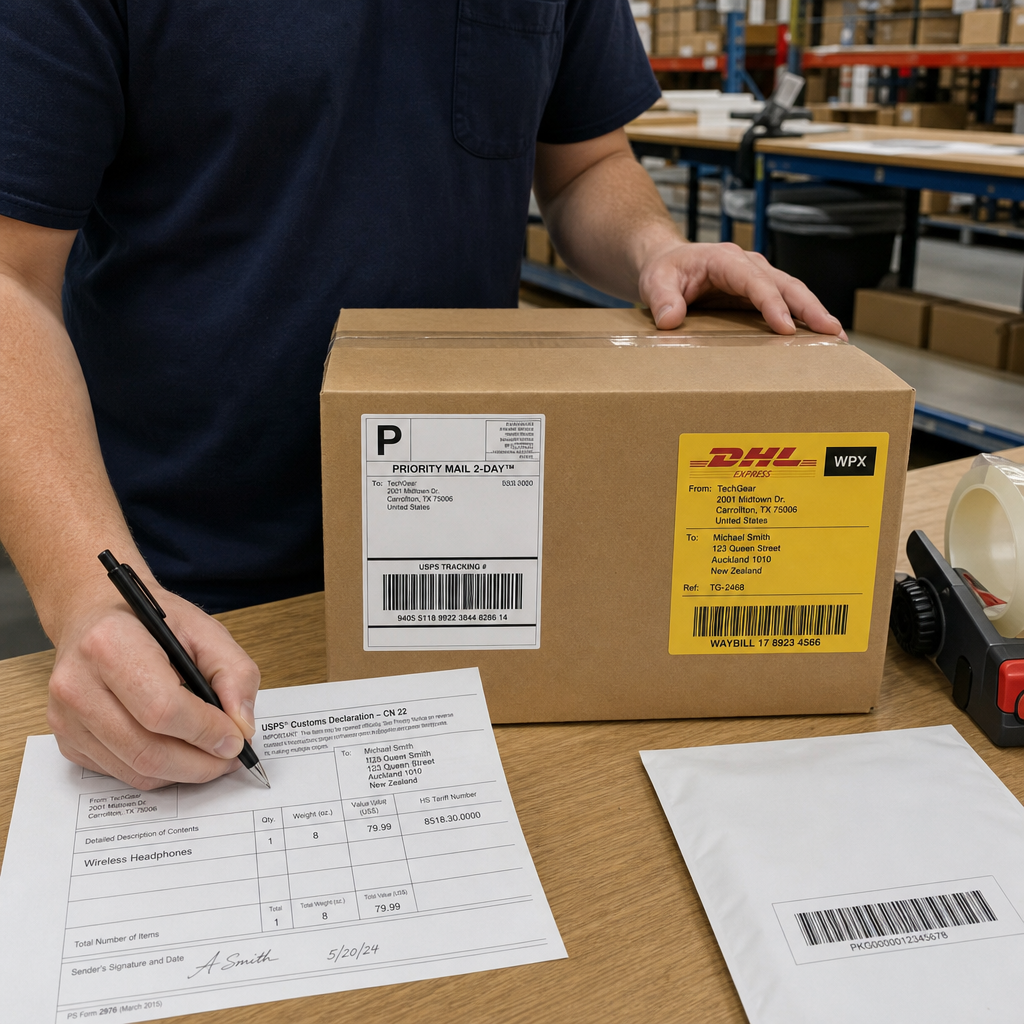
Shopify Cross-Border Shipping: Carriers, DDP vs. DDU, and Duty Collection
This is where most international expansion guides fall short — and where real orders succeed or fail. Getting shipping wrong costs you more in returns and customer service than any currency fee.
Carrier Options for US International Shipping
Three primary carriers cover the majority of US international shipments:
- USPS First-Class Package International / Priority Mail International — best for lightweight packages under 4 lbs to Canada, UK, and Australia. Rates start around $14–$22 for Canada, $24–$40 for UK/EU. No real-time tracking in some countries beyond the US border — a known limitation.
- UPS and FedEx via Shopify Shipping — Shopify’s discounted rates through its carrier partnerships can save 30–60% off retail UPS/FedEx international rates. Available directly in your Shopify Shipping settings under Settings → Shipping and delivery → Carrier accounts. Best for packages over 2 lbs where tracking reliability matters.
- DHL Express — fastest international option (2–5 business days to most countries), includes door-to-door tracking, and handles customs documentation more reliably than USPS. DHL also has strong infrastructure in the Middle East and Southeast Asia where USPS coverage is inconsistent. Rates are higher ($35–$80+ for a 2 lb package to Europe), but for high-AOV stores, the reduced loss rate on packages justifies the cost.
For most US SMB retailers starting out, the practical stack is: USPS for Canada + UK on orders under $50, DHL Express for EU and Asia, and Shopify Shipping discounts for UPS/FedEx on heavier domestic-adjacent shipments.
DDP vs. DDU: The Decision That Affects Your Return Rate
This is the most misunderstood piece of international shipping logistics. Understanding it can meaningfully reduce your refund rate.
DDU (Delivered Duty Unpaid) means the customer pays import duties and taxes when the package arrives in their country — after they’ve already paid you. The carrier (or local postal authority) sends them a bill before delivery. If that bill surprises them — because your checkout didn’t mention it — many customers refuse the package. You get it back, you pay return shipping, and you refund. On a $60 item shipped to Germany, import duties plus German VAT (19%) can add €15–€25. That’s a real surprise.
DDP (Delivered Duty Paid) means you collect duties and taxes at checkout and remit them on the customer’s behalf. The customer pays once, knows the total cost upfront, and the package clears customs without a second bill. Return rates drop. Customer satisfaction rises.
How to enable DDP through Shopify Markets:
- Go to Settings → Markets and select the market (e.g., European Union)
- Click Duties and import taxes
- Toggle on Collect duties and import taxes at checkout
- Select Include duties in product price or Show duties as a line item at checkout — the line-item approach is more transparent and reduces cart abandonment from sticker shock
- Enter your HS (Harmonized System) codes for each product category — Shopify uses these to calculate the correct duty rate per country. You can bulk-edit HS codes via a CSV upload under Products → Export
- Save changes and test with a browser in incognito mode using a VPN set to the target country
One trade-off: enabling DDP means you’re responsible for accurate HS code classification. Incorrect HS codes can lead to customs delays or underpaid duties (which creates liability). If your catalog has more than 100 SKUs across diverse product categories, consider using Zonos or Landed Cost apps that automate HS code mapping. Both integrate with Shopify and cost $50–$200/month depending on volume.

Legal and Tax Considerations for US Retailers Selling Internationally
Cross-border selling doesn’t automatically create foreign tax obligations — but it can, depending on your sales volume. Here’s what actually matters for most US SMB retailers:
VAT in the European Union
If you sell to EU customers and your annual EU-wide sales exceed €10,000 (roughly $11,000 USD), you’re required to collect and remit VAT. The EU’s One-Stop Shop (OSS) system lets you register once and file a single quarterly return covering all 27 EU member states. Without OSS registration, you’d technically need to register in each country separately.
Practical steps: Register for EU VAT OSS through any EU member state’s tax authority (Germany’s Bundeszentralamt für Steuern and Ireland’s Revenue are commonly used by US merchants). Once registered, Shopify’s Markets duty/tax collection handles the calculation at checkout — you collect the VAT from customers and remit it quarterly.
GST/HST for Canada
If your annual Canadian sales exceed CAD $30,000, you’re required to register for and collect Canadian GST/HST. The Canada Revenue Agency (CRA) has a simplified registration process for non-resident vendors. Shopify Markets can display and collect Canadian tax at checkout once you’ve entered your GST/HST registration number under Settings → Taxes and duties → Canada.
UK VAT Post-Brexit
The UK left the EU VAT system. For goods under £135 shipped to UK customers, you must register for UK VAT and collect it at the point of sale. HMRC’s non-UK VAT registration process is straightforward and can be completed online. The threshold was effectively £0 for distance selling to UK consumers as of 2021 — there’s no de minimis exemption for B2C sales of goods under £135.
Managing Logistics and Fulfillment at Scale
Once international orders start flowing, manual fulfillment gets unwieldy fast. Three options US retailers typically use:
- In-house fulfillment with Shopify Shipping — works well up to 50–100 international orders per month. Print international customs forms directly from your Shopify admin (included in the shipping label purchase). Shopify auto-fills CN22/CN23 customs forms for USPS shipments.
- Third-party logistics (3PL) with international hubs — services like ShipBob, Fulfillment by Amazon (FBA), and Whiplash have warehouses in Canada, UK, and EU. Storing inventory closer to your international customers eliminates customs delays and reduces shipping costs by 40–60%. The trade-off is minimum volume commitments (typically 100+ orders/month per location) and per-unit storage fees.
- Dropshipping with Oberlo/DSers — if your store uses dropshipping, suppliers on AliExpress or CJ Dropshipping often ship directly from China to international customers. This sidesteps your fulfillment entirely but introduces longer delivery windows (10–25 days) that can hurt conversion in markets accustomed to 2–3 day delivery.
For most US retailers doing their first international expansion, start with in-house fulfillment and Shopify Shipping. Once international volume hits 200+ orders/month, model the 3PL economics — the per-order savings usually justify the fixed costs at that point.
Real Merchant Results: What Shopify’s Data Shows
Rather than citing unverifiable revenue claims, here’s what Shopify’s own merchant data and earnings reports consistently show: merchants who activate international markets see incremental revenue from geographies that previously generated zero orders. The lift isn’t about converting existing customers differently — it’s about unlocking customers who bounced at checkout because the price was in USD or the shipping estimate was blank.
A practical benchmark from Shopify’s merchant success team: stores that add local currency display typically see a 12–40% improvement in conversion rate from international traffic, depending on how much that traffic was already present but unconverted. If you have 500 monthly visitors from the UK and none are buying, enabling GBP pricing and UK shipping rates costs you a few hours of setup for a test that will answer the question definitively within 30 days.
Key Takeaways
- Shopify Markets international selling works within your existing store — no second store required. Enable it under Settings → Markets.
- Shopify Payments is a prerequisite for multi-currency conversion. Budget 1.5% per transaction in conversion fees, roughly $1.50 per $100 order.
- Start with English-speaking markets (Canada, UK, Australia) for fastest time-to-revenue — currency-only setup, no translation needed.
- For EU non-English markets, budget $200–$600 per language for professional translation and register for EU VAT OSS once you exceed €10,000 in EU annual sales.
- Choose DDP (collect duties at checkout) over DDU to prevent package refusals and reduce return rates. Enable it under Settings → Markets → Duties and import taxes.
- Use DHL Express for reliable tracking to EU and Asia. Use Shopify Shipping discounts for UPS/FedEx on heavier shipments. Use USPS for Canada/UK orders under $50.
- Accurate HS codes are required for DDP to work correctly — bulk-edit them via CSV for large catalogs.
Your Next Steps
International expansion through Shopify Markets is genuinely achievable for small and mid-size US retailers. The technology handles the currency, tax calculation, and checkout localization. Your job is to make a few deliberate decisions: which markets to activate first, how to handle duties, and which carrier to use for each destination.
Start with one market — Canada is the lowest-friction choice for a US store. Enable CAD pricing, add a Canada-specific shipping rate in Shopify Shipping, toggle on duty collection, and let it run for 30 days. The data you get will tell you whether to expand further and where.
Have a specific market you’re trying to crack, or a question about a step in this guide? Drop it in the comments below — real questions get real answers. And if you found this guide useful, share it with a fellow Shopify merchant who’s been putting off their international launch.
FAQ
Do I need a separate Shopify store for each country I sell to?
No. Shopify Markets lets you create geo-targeted storefronts — each with its own currency, language, and pricing — all from a single Shopify admin. You manage everything in one place under Settings → Markets, without duplicating your product catalog or running parallel stores.
What is the Shopify multi-currency conversion fee and how much does it cost?
Shopify charges a 1.5% currency conversion fee on transactions processed in non-USD currencies through Shopify Payments. On a $100 order, that's $1.50. It's deducted before your payout settles in USD. This fee only applies when the customer pays in their local currency — it's separate from your plan's per-transaction rate.
What's the difference between DDP and DDU shipping, and which should I use?
DDU (Delivered Duty Unpaid) means the customer pays import duties after delivery — often as a surprise bill — which leads to package refusals and returns. DDP (Delivered Duty Paid) collects duties at checkout so customers see the full cost upfront. For most international markets, DDP significantly reduces return rates and improves customer experience.
Do I need to collect VAT if I sell to European customers?
Yes, if your annual EU-wide sales exceed €10,000. You must register for the EU's One-Stop Shop (OSS) VAT system, which lets you file one quarterly return covering all 27 EU member states. Shopify Markets calculates and collects the correct VAT rate at checkout once your registration number is entered in your tax settings.
Which shipping carrier should a US retailer use for international orders?
For Canada and UK orders under $50, USPS Priority Mail International offers the best cost-to-speed ratio. For EU and Asia, DHL Express provides reliable door-to-door tracking and faster customs clearance. Shopify Shipping's discounted UPS and FedEx rates work well for heavier packages. Start with USPS + DHL, then evaluate 3PL options once you exceed 200 international orders per month.
Can I use Shopify Markets without switching to Shopify Payments?
Partially. You can create international markets and set country-specific pricing without Shopify Payments, but real-time local currency conversion at checkout requires Shopify Payments. Without it, prices display in USD to all customers regardless of their location. Switching to Shopify Payments also eliminates the 0.5–2% third-party transaction fee on paid Shopify plans.
How long does it take to set up Shopify Markets for a new international market?
For an English-speaking market like Canada or Australia — currency only, no translation — setup takes 2–4 hours. This includes enabling the market, setting shipping rates, and testing checkout. For a non-English EU market requiring translation and VAT registration, budget 2–5 days of setup plus 1–3 weeks for VAT OSS approval before you can legally collect and remit VAT.
