


如何将您的Magento 1网站迁移到Shopify平台?
随着Magento 1在2020年6月停止支持,所有Magento商店的拥有者都在努力将他们现有的网站迁移到Magento 2或其他一些流行的电子商务平台,如Shopify或WooCommerce。
最近我将我的一个客户的两个Magento 1网站迁移到Shopify。最初我们计划使用一些流行的数据迁移工具将数据从Magento迁移到Shopify,但对我们来说效果并不好。
这是我成功迁移所遵循的步骤。
1 – 准备 Magento 数据以适应 Shopify 格式
Getbras.com 正在销售女性内衣,产品已作为可配置产品添加到 Magento 网站,并根据尺寸和颜色进行子变体。因此,我们需要在 Shopify 网站上遵循相同的结构。
我们可以直接从 Magento 导出数据到 CSV,但我们无法获得确切的结构以便导入到 Shopify。因此,我决定编写一个自定义的 PHP 脚本,从 Magento 1 生成数据并将其保存到 MYSQL 表中。您可以直接导出到 CSV,存储表可以帮助我们在需要时进行一些后续处理。
导入可配置产品到 Shopify 所需的必要数据包括:
- 处理
- 标题
- 身体 HTML
- 供应商
- 类型
- 标签
- 已发布
- 选项1名称
- 选项1 值
- 选项2名称
- 选项2 值
- 变体SKU
- 变体克
- 变体_库存_跟踪器
- 变体_库存_数量
- 变体_库存_政策
- 变体_履行_服务
- 变体_价格
- 变体_比较_原价
- 变体_需要_发货
- 变体_应税
- 变体条形码
- Image_Src
- 图像位置
- 图像替代文本
- SEO_标题
- SEO_描述
- 变体_重量_单位
- 变体税码
我已经创建了一个 MySQL 表来存储上述数据,并使用自定义的 Magento 1 脚本生成数据。以下是使用的 PHP 代码:
<?php
ini_set('memory_limit','2048M');
ini_set('max_execution_time',12000);
require_once "app/Mage.php";
$root=$_SERVER['DOCUMENT_ROOT'];
Mage::app("default");
Mage::app()->loadAreaPart(Mage_Core_Model_App_Area::AREA_FRONTEND,Mage_Core_Model_App_Area::PART_EVENTS);
//Mage::init();
$connection = Mage::getSingleton('core/resource')->getConnection('dbname');
$_helper = Mage::helper('catalog/output');
$helper = Mage::helper('shoppersettings/image');
$imgX = 252;
$imgY = $helper->calculateHeight($imgX);
//$filename = 'google_pla_feed_magento.csv';
$link=mysql_connect("localhost",'','');
mysql_select_db('dbname',$link);
https://bras-honey.myshopify.com/search?type=product&q=Loungeable%2Bboutique
$_productCollection = Mage::getModel("catalog/product")->getCollection()->addAttributeToSelect(array('pre_order','name', 'price','special_price','brand','color','size','lingerie_type', 'image', 'status','short_description','description','sku','created_at'))
->addAttributeToFilter('type_id', array('eq' => 'configurable'))
->addAttributeToFilter('entity_id', array('gt' => $last_id))
->addAttributeToFilter('status', array('eq' => Mage_Catalog_Model_Product_Status::STATUS_ENABLED));
//->setPageSize(10);
//->setCurPage($p)
$i=0;
$k=0;
foreach ($_productCollection as $_product):
$name= $_product->getName();
$name=str_replace("&","&",$name);
$sku=$_product->getSku();
$created_at=$_product->getCreatedAt();
$text=explode(" ",$sku);
$sku=$text[0];
$url_key = $_product->getProductUrl();
$full_url_key = $_product->getProductUrl();
//preparing unique handle for shopify
$url_key = str_replace("https://www.example.com/", "", $url_key);
$url_key = str_replace(".html", "", $url_key);
$id=$_product->getId();
$pre_order_status=$_product->getPreOrder();
if($pre_order_status==""):
$pre_order_status=0;
endif;
$product = Mage::getModel('catalog/product')->load($id);
$desc=strip_tags($product->getDescription());
$desc=str_replace(" "," ",$desc);
$desc=str_replace("&","&",$desc);
$desc1=$product->getDescription();
$short_desc1=$product->getShortDescription();
$productMediaConfig = Mage::getModel('catalog/product_media_config');
$image_url = $productMediaConfig->getMediaUrl($product->getImage());
$final_price=$product->getFinalPrice();
$meta_title=$product->getMetaTitle();
$meta_desc=$product->getMetaDescription();
$special_price=$product->getSpecialPrice();
$type_id=$product->getLingerieType();
$brand_id=$product->getBrand();
$final_price=number_format($final_price, 2, '.', '');
$desc1=str_replace(" "," ",$desc1);
$desc1=str_replace("&","&",$desc1);
$desc1=str_replace('\\',"",$desc1);
$desc1=str_replace("'","\'",$desc1);
$short_desc1=str_replace(" "," ",$short_desc1);
$short_desc1=str_replace("&","&",$short_desc1);
$short_desc1=str_replace('\\',"",$short_desc1);
$short_desc1=str_replace("'","\'",$short_desc1);
$desc1 = $short_desc1.$desc1;
preg_match_all('~<a(.*?)href="([^"]+)"(.*?)>~', $desc1, $matches);
foreach ($matches[2] as $key => $value) {
$value = str_replace("https://www.example.com/", "", $value);
$value = str_replace("http://www.example.com/", "", $value);
// echo '-----';
//replacing magento url in the content with shopify url
$sql1="SELECT id_path FROM mg_core_url_rewrite WHERE request_path='$value'";
$res1=mysql_query($sql1,$link) or die(mysql_error());
if(mysql_num_rows($res1)>0){
while($rs1=mysql_fetch_object($res1)){
$id_path = $rs1->id_path;
if(strpos($id_path,'product/') !== false){
$value1 = 'products/'.$value;
$desc1 = str_replace($value,$value1,$desc1);
}elseif(strpos($id_path,'category/') !== false){
$text = explode("/",$value);
$l = count($text);
$value1 = 'collections/'.$text[$l-1];
$desc1 = str_replace($value,$value1,$desc1);
}
}
}
if(strpos($value,'catalogsearch/') !== false){
$text = explode("?q=",$value);
$value1 = 'search?type=product&q='.$text[1];
$desc1 = str_replace($value,$value1,$desc1);
}
}
$desc1 = str_replace(".html","",$desc1);
$pId="";
$status=0;
$lingerie_type="";
$brand = Mage::getModel('catalog/product')->load($id)->getAttributeText('brand');
$brand1=$brand;
$brand=str_replace("&","&",$brand);
$lingerie_type = Mage::getModel('catalog/product')->load($id)->getAttributeText('lingerie_type');
$lingerie_type1=$lingerie_type;
$lingerie_type=str_replace("&","&",$lingerie_type);
if($lingerie_type==""):
$lingerie_type="Lingerie";
endif;
$product = Mage::getModel('catalog/product')->load($id);
$childProducts = Mage::getModel('catalog/product_type_configurable')->getUsedProducts(null,$product);
$cats = $_product->getCategoryIds();
$j=0;
$category_name="";
foreach ($cats as $category_id){
$_cat = Mage::getModel('catalog/category')->load($category_id) ;
if($j<10):
$category_name.=trim($_cat->getName()).',';
endif;
$j++;
}
$category_name=substr($category_name,0,strlen($category_name)-1);
//getting child variants of magento configurable products
foreach($childProducts as $child) {
$k++;
$child_sku =$child->getSku();
$child_id=$child->getId();
$child_name=$child->getName();
$weight=$child->getWeight();
$qty=$child->getQty();
$size_id=$child->getSize();
$color_id=$child->getColor();
$type_id =$child->getLingerieType();
$size = Mage::getModel('catalog/product')->load($child_id)->getAttributeText('size');
$color = Mage::getModel('catalog/product')->load($child_id)->getAttributeText('color');
$lingerie_type = Mage::getModel('catalog/product')->load($child_id)->getAttributeText('lingerie_type');
$text=explode("-",$child_sku);
$text1=explode(" ",$text[2]);
$child_sku=$text[0].'-'.$text[1].'-'.$text1[0];
$name = mysql_real_escape_string($name);
$meta_title = mysql_real_escape_string($meta_title);
$meta_desc = mysql_real_escape_string($meta_desc);
//adding product temp mysql table
$sql="INSERT INTO magento_shopify(Handle,Title,Body_HTML,Vendor,Type,Tags,Option1_Value,Option2_Value,Variant_SKU,Variant_Grams,Variant_Inventory_Qty,Variant_Price,Variant_Compare_At_Price,Variant_Barcode,Image_Src,Image_Position,Image_Alt_Text,SEO_Title,SEO_Description,Variant_Tax_Code) VALUES ('$url_key','$name','$desc1','$brand','$lingerie_type','$category_name','$color','$size','$child_sku','$weight','$qty','$final_price','$special_price','','$image_url','','$name','$meta_title','$meta_desc','')";
mysql_query($sql,$link) or die(mysql_error());
}
$i++;
endforeach;
exit;
?>
After run above script you can see all of your necessary magento data in mysql table. You can check and verify using phpmyadmin
An example screenshot here: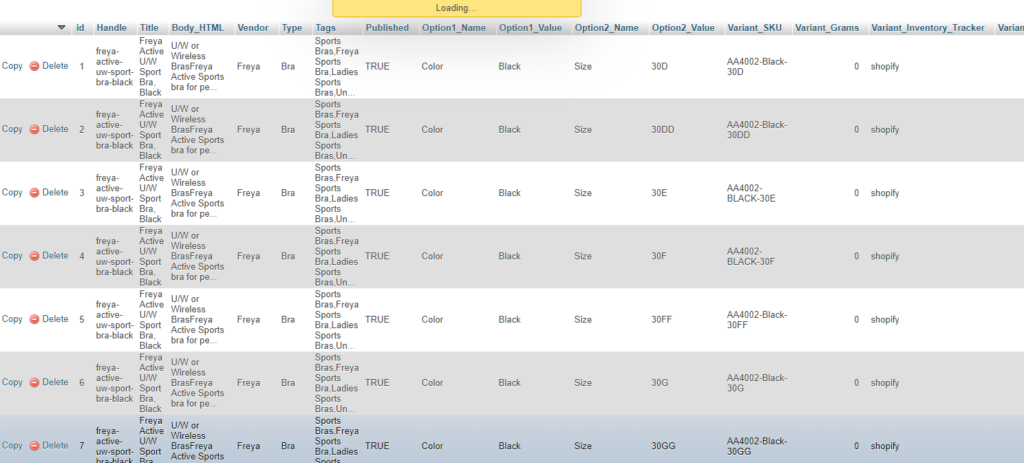
现在您可以从 phpmyadmin 导出数据。
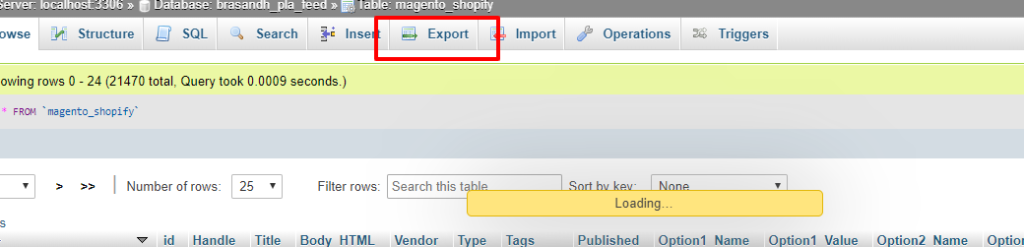
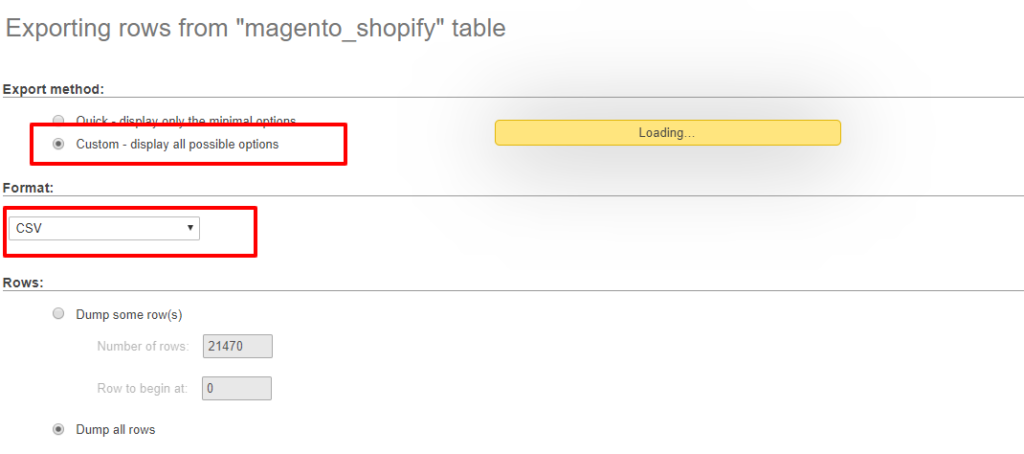
将数据导出为CSV格式,并将列名添加为标题。
导出数据后,需要在 Excel 中打开 CSV 文件并更新列标题,使其与 Shopify 导入 CSV 模板匹配,下面是我们使用的示例 CSV。

